Showing posts with label slide show. Show all posts

Do You Believe that Your Slides are THE Presentation?


Presentation Tips on Twitter Presentation Skills Club on Facebook Executive Speech Coach, Business presentation tips from George Torok, the Speech Coach for Executives Share/Save/Bookmark

Save Us From Ugly PowerPoint Slides

How can you change this ugly PowerPoint typical bar chart slide ...


...into this simple and more visual pleasing PowerPoint slide?


Notice that the second slide is more visually pleasing. It's also much easier to understand the key point - that Australia leads the world in this study.

If you are ready to display better PowerPoint Slides with your next presentation and you would like to learn how to create these slides faster yourself - then check out this guide:

Slides Made Simple

There's no need to spend thousands of dollars hiring a design company to create your slides.

There's no need to embarrass yourself by using boring and ugly slides.

There's no need to waste day's learning how to be a graphic designer.

Download this practical guide to creating simple and effective visual slides and you will immediately start re-programing your brain to design better slides every time.

Better PowerPoint Slides Now gt
Click here to grab your copy of Slides Made Simple

PS: It comes with a money back guarantee.


Presentation Tips on Twitter Presentation Skills Club on Facebook Executive Speech Coach, Business presentation tips from George Torok, the Speech Coach for Executives Share/Save/Bookmark

Impressive PowerPoint Presentation for a change

Enjoy this PowerPoint presentation with lots of powerful visuals - along with tips of how to do it yourself. As you view this, remember that PowerPoint is best when used as a visual medium. Text is not a visual even when displayed on a screen. Text is simply text and that does not reach the visual learners.


STEAL THIS PRESENTATION!
View more presentations from @JESSEDEE

http://www.slideshare.net/presentationCoach

Presentation Tips on Twitter Presentation Skills Club on Facebook
Executive Speech Coach, Business presentation tips from George Torok, the Speech Coach for Executives
Share/Save/Bookmark

PowerPoint Tips, Mistakes and Ideas from 2011

What are the best ideas that you can use to improve your PowerPoint Presentations?


What if Your PowerPoint Slides Make You a Liar?


The marketing director of a well known Internet company presented us with fascinating stats about Internet use and users.

I was captivated by the numbers and percentages until he reached the graph slide in his PowerPoint presentation.

One of my colleagues raised his hand to ask a question. The presenter innocently paused to take the question and was blindsided by what happened next.


Black Death Versus PowerPoint


It's estimated that the Bubonic Plague (Black Death) killed 20 to 50 million people in Europe between 1347 and 1351. It's attack was swift and merciless. People didn't know how to deal with this threat. They didn't understand nor appreciate personal hygene nor sewage removol. They were vomitting in the streets - and dieing horibily. Almost half of the European population was eliminated in four years.


How Many Words Can You Have on Your Slides?


This is a question that more presenters need to ask before they speak. How many words should you put on your PowerPoint slides? What is the maximum number of words?


Geoff Ramm Presenting With PowerPoint


I watched my good friend from the UK, Geoff Ramm present at a few conferences. We were fellow speakers on this speaking tour. Geoff is a marketing expert and specializes in Observational Marketing. That means he looks around and reports what he sees – especially what seems to be working.
In his presentations Geoff made the best use of PowerPoint that I’ve seen. Too many speakers use PowerPoint as a crutch or shield. You know those speakers who simply repeat the words on the slide or constantly check the slides so they are reminded of what to say next.
 
 
Executive Speech Coach, Business presentation tips from George Torok, the Speech Coach for Executives.

Share/Save/Bookmark

How Many Words Can You Have on Your Slides?


This is a question that more presenters need to ask before they speak. How many words should you put on your PowerPoint slides? What is the maximum number of words?

I wish more people would ask me because I would tell them - zero, zip, nada. PowerPoint slides should be for images only because it is a visual medium. Text is not visual. Images - photos, diagrams and charts are visual.

But, those people don't seem to listen to me.


Here is a tip that business presenters might find more palatable.

"Put as many words but no more on the slide than you can speak in one breath."

That practical advice comes from my friend, colleague and professional speaker, Mark Ellwood. He is a productivity expert who helps business professionals make better use of their most limited resource - time.

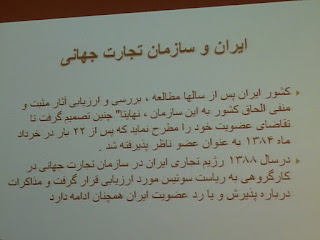
The photo above is a picture of a slide from a presentation I attended at a conference in Iran. As you can see - it has way too many words on the slide and no visuals at all. This PowerPoint scourge encompasses the globe.

The bad news is that presenters all around the world have been seduced into delivering boring PowerPoint presentations.

The good news is that presenters all around the world have been seduced into delivering boring PowerPoint presentations.

The wonderful news for you is that you can stand out from the competition by using less words and more visuals on your PowerPoint slides.

Look at your slide and try to read it out loud in one breath. I dare you! Then remove the excess words.

George Torok
Speech Coach for Executives
Presentation Skills Training
Presentation Skills Club on Facebook


Executive Speech Coach, Business presentation tips from George Torok, the Speech Coach for Executives.

Share/Save/Bookmark

Top 10 Tips for Presenting Your Key Points - Slideshow

Discover techniques that you can use to emphaise the key points of your presentation message.


Executive Speech Coach, Business presentation tips from George Torok, the Speech Coach for Executives.
Share/Save/Bookmark